
تحول و رشد مهارتها
در برنامه ارزیابیها، امکان مشاهده روند پیشرفت مهارتهای کارمندان در طول زمان در گزارش تکامل مهارتها، که به عنوان گزارش مهارتهای ارزیابی نیز شناخته میشود، وجود دارد.
مدیران میتوانند از این گزارش برای مشاهده اینکه چه کسی به اهداف مهارتی مختلف تعیین شده در ارزیابیهای خود دست مییابد، چه کسی مهلتهای مهارتی خود را رعایت میکند، چه کسی بالاترین عملکرد را از نظر توسعه مهارت دارد و موارد دیگر استفاده کنند.
گزارش تکامل مهارتها همچنین امکان جستجوی کارمندان با مهارتهای خاص در سطوح معین را فراهم میکند که میتواند برای سناریوهایی که به مهارتهای خاصی نیاز است، مفید باشد.
گزارش تکامل مهارتها
برای دسترسی به گزارش تکامل مهارتها، وارد مسیر شوید.
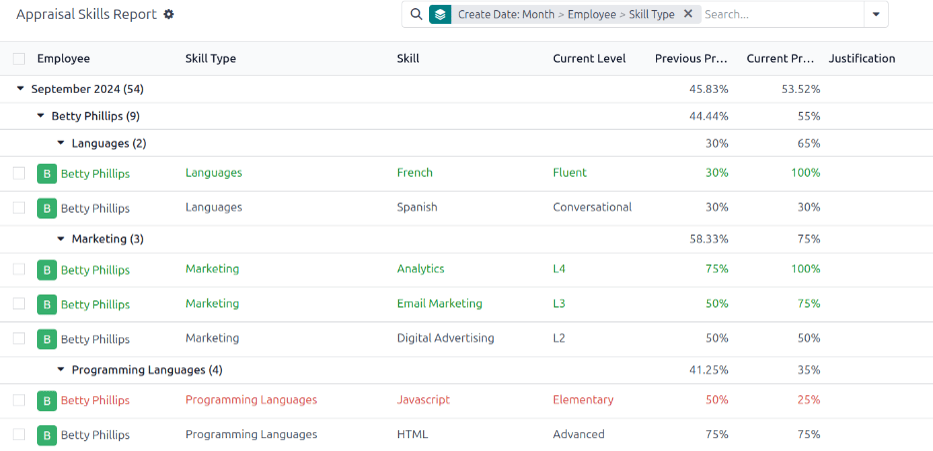
Doing so reveals the Appraisal Skills Report page, which displays a report of all skills, grouped by employee, in alphabetical order, by default.
توجه
Skill levels are only updated after an appraisal is marked as done. Any skill level changes from ongoing appraisals that have not been finalized are not included in this report.
All the Employee lines are expanded, with all the various skill types nested below. Each individual skill type is collapsed, by default. To view the individual skills contained within a skill type, click anywhere on the skill type line to expand the data.
Each skill has the following information listed:
کارمند: نام کارمند.
نوع مهارت: دستهبندی که مهارت در آن قرار میگیرد.
مهارت: مهارت خاص و فردی.
Previous Skill Level: the level the employee had previously achieved for the skill.
Previous Skill Progress: the previous percentage of competency achieved for the skill (based on the Skill Level).
Current Skill Level: the current level the employee has achieved for the skill.
Current Skill Progress: the current percentage of competency achieved for the skill.
توجیه: هر یادداشتی که روی مهارت وارد شده و پیشرفت را توضیح میدهد.
رنگ متن مهارت، هرگونه تغییر را نسبت به ارزیابی قبلی نشان میدهد. سطوح مهارتی که از ارزیابی قبلی افزایش یافتهاند به رنگ سبز، به عنوان یک بهبود، ظاهر میشوند. سطوح مهارتی که تغییر نکردهاند به رنگ سیاه، به عنوان بدون تغییر، ظاهر میشوند. مهارتهایی که پسرفت داشتهاند به رنگ قرمز، به عنوان پسرفت، ظاهر میشوند.
این گزارش را میتوان با تنظیم فیلترها و گروهبندیهای موجود در نوار جستجوی بالا، برای یافتن اطلاعات خاص اصلاح کرد.
نمونه استفاده: شناسایی کارمندان با مهارتهای خاص
Since the Appraisal Skills Report organizes all skills by employee, it can be difficult to find employees with a specific skill at a specific level. To find these employees, a custom filter must be used.
در این مثال، گزارش برای نمایش کارمندانی با سطح تخصص دانش جاوا اسکریپت اصلاح شده است. برای مشاهده این کارمندان، ابتدا تمام فیلترهای فعال را در نوار جستجو حذف کنید.
Next, click the :icon:`fa-caret-down` (down arrow) icon in the search bar, then click Add Custom Filter beneath the :icon:`fa-filters` Filters column to load an Add Custom Filter pop-up window.
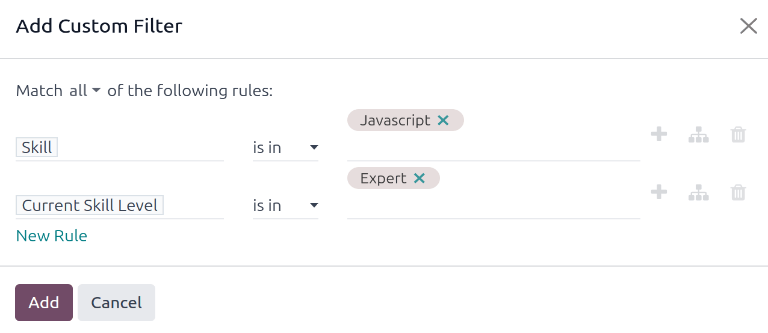
Using the drop-down menu in the first field, select Skill. Then, keep the second field as-is, and select Javascript from the third drop-down menu in the third field.
Next, click New Rule, and another line appears. In this second line, select Current Skill Level for the first drop-down field, leave the second field as-is, then select Expert for the third drop-down field.
After the New Rule button is clicked, the word "any" in the sentence Match any of the following rules:, changes from plain text into a drop-down menu. Click the :icon:`fa-caret-down` (down arrow) icon after the word any, and select all.
در نهایت، روی دکمه افزودن کلیک کنید.
اکنون، فقط کارمندانی که سطح متخصص برای مهارت جاوا اسکریپت دارند، ظاهر میشوند. در این مثال، فقط کارمند دمو این معیارها را برآورده میکند.

همچنین ملاحظه نمائید