
برگهای بستانکار و بازپرداختها
A credit/debit note, or credit/debit memo, is a document issued to a customer that notifies them that they have been credited/debited a certain amount.
چند مورد مصرف موجب ایجاد برگه بستانکاری میشوند، از جمله:
اشتباه در فاکتور
برگشت محصولات یا رد خدمات
آسیبدیدگی کالاهای ارسال شده
برگههای بدهکاری کمتر رواج دارند و اغلب برای رهگیری بدهیهایی استفاده میشوند که مشتریان یا فروشندگان به خاطر اصلاحیههای تأیید شده فاکتور مشتری یا صورتحساب فروشنده ایجاد شدهاند.
توجه
Issuing a credit/debit note is the only legal way to cancel, refund, or modify a validated invoice. Do not forget to register the payment afterward if you need to send money back to your customer and/or validate the return if a storable product is returned.
Issue a credit note
You can create a credit note from scratch by going to , and by clicking on Create. Filling out a credit note form works the same way as an invoice form.
However, most of the time, credit notes are generated directly from the related invoices. To do so, go to , open the related customer invoice, and click on Credit Note.
You can choose between three options:
Partial Refund
Full Refund
Full refund and new draft invoice
توجه
A credit note sequence starts with R and is followed by the number of the related document
(e.g., RINV/2019/0004 is related to the invoice INV/2019/0004).
Partial refund
When selecting the Partial Refund option, Odoo creates a draft credit note already prefilled with all the necessary information from the original invoice. This is the option to choose if you wish to do a partial refund or if you want to modify any detail of the credit note.
توجه
This is the only option for invoices marked as in payment or paid.
Full refund
When selecting the Full Refund option, Odoo creates a credit note, automatically validates it, and reconciles it with the related invoice.
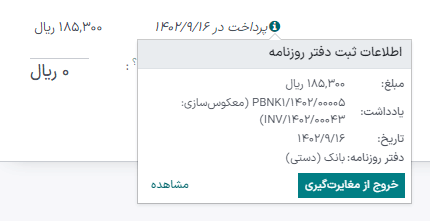
This is the option to choose for a full refund or to cancel a validated invoice.
Full refund and new draft invoice
When selecting the Full refund and new draft invoice option, Odoo creates a credit note, automatically validates it, reconciles it with the related invoice, and opens a new draft invoice prefilled with the same details from the original invoice.
This is the option to modify the content of a validated invoice.
Issue a debit note
You can create a debit note from scratch by going to or by clicking on the related invoice you wish to issue a debit note for. On the invoice form view, click Cog icon (⚙) --> Debit Note, fill in the information, and click Create Debit Note.
ثبت بازپرداخت فروشنده
Vendor refunds are recorded the same way as credit notes:
You can either create a credit note from scratch by going to , and by clicking on Create; or by opening the related vendor bill, and clicking on Credit Note.
Record a debit note
Debit notes from vendors are recorded in a similar way to how they are issued to customers:
Go to , open the related bill you wish to record a debit note for, and click Cog icon (⚙) --> Debit Note. Fill in the information, and click Create Debit Note.
ثبتهای دفتر روزنامه
Issuing a credit/debit note from an invoice/bill creates a reverse entry that zeroes out the journal items generated by the original invoice.
Example
The journal invoice of an entry:

And here is the credit note’s journal entry generated to reverse the original invoice above:
