
ثبت ورود و خروج
Odoo's Attendances application allows users, who are logged into the database, to check in and out, without needing to go into the Attendances application, or use a kiosk. For smaller companies, where every employee is also a user, this feature may be useful.
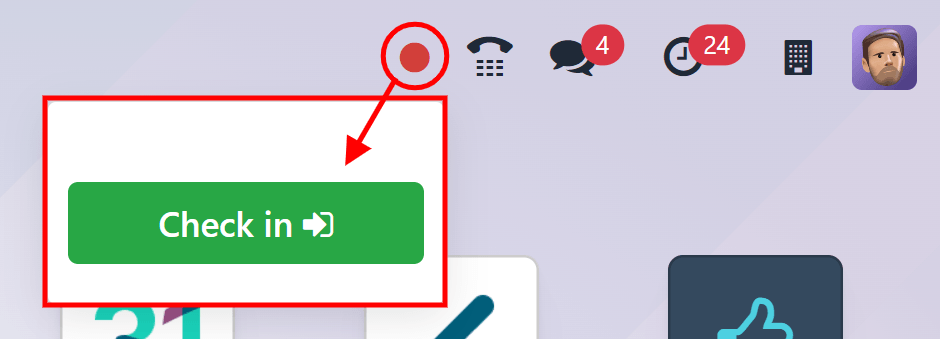
A user can check in and/or out on the main database Odoo dashboard, or while inside any application. To do so, in the upper-right corner of the top main header menu, which is always visible regardless of what application the user is in, a 🔴 (red circle) or 🟢 (green circle) is visible. Click on the colored circle to reveal the attendance widget, enabling the user to check in and/or out.

ثبت ورود
If the attendance widget circle is red, this indicates the user is not currently checked in. Click the 🔴 (red circle), and the attendance widget appears, displaying a green Check in :icon:`fa-sign-in` button.
When the user checks in from the database, the Attendances app logs the location details for the user, including the IP Address and GPS coordinates.
مهم
For the Attendances app to log the location details, the user must allow their computer to access their location information.
اگر کاربر در روز کاری جاری هنوز ورود و خروج نکرده باشد، این دکمه تنها آیتم قابل مشاهده در ویجت است. اگر کاربر قبلاً ورود و خروج کرده باشد، فیلد مجموع امروز در بالای دکمه ظاهر میشود و کل مدت زمانی که برای آن روز ثبت شده است در آن فیلد، با فرمت HH:MM (ساعت:دقیقه) نمایش داده میشود.
Click the Check in :icon:`fa-sign-in` button to check in. The 🔴 (red circle) in the top menu changes to green, and the widget changes appearance, as well. The widget updates to reflect that the user has checked in, by changing the green Check in :icon:`fa-sign-in` button to a yellow Check out :icon:`fa-sign-out` button.
برای بستن ویجت حضور و غیاب، روی هر جای صفحه کلیک کنید.
ثبت خروج
اگر کاربر برای اولین بار خروج میکند، عبارت از ساعت HH:MM (AM/PM) در بالای ویجت ظاهر میشود و فیلد زمان بر اساس زمانی که کاربر ورود کرده تکمیل میشود. زیر آن سطر، ساعتها و دقایقی که از زمان ورود گذشته است با فرمت HH:MM نمایش داده میشود. با گذشت زمان، این مقدار برای نشان دادن ساعتها و دقایق گذشته از زمان ورود کاربر، بهروز میشود.
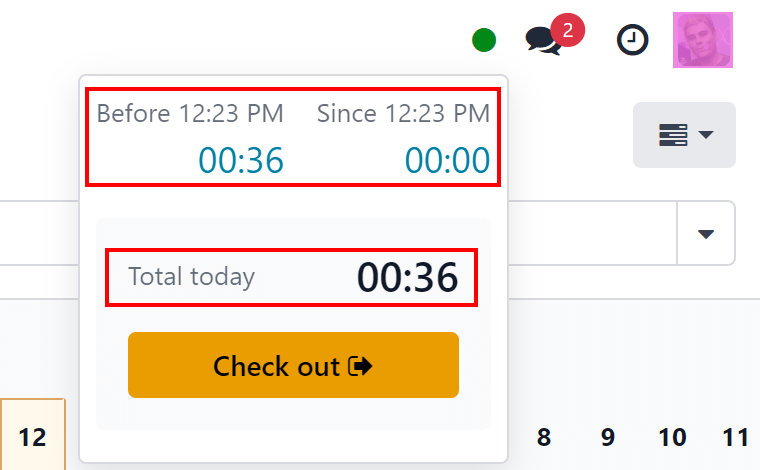
اگر کاربر قبلاً ورود و خروج کرده باشد، فیلدهای بیشتری نمایش داده میشوند. علاوه بر فیلد از ساعت HH:MM (AM/PM)، یک فیلد قبل HH:MM (AM/PM) نیز ظاهر میشود. زمانهای نمایش داده شده در هر دوی این فیلدها مطابقت دارند و با آخرین زمان ورود پر میشوند. زیر فیلد قبل HH:MM (AM/PM)، زمان ثبت شده قبلی با فرمت HH:MM (ساعت:دقیقه) نمایش داده میشود.
علاوه بر این، زیر این دو فیلد، فیلد مجموع امروز ظاهر میشود. این فیلد مجموع هر دو فیلد قبل HH:MM (AM/PM) و از ساعت HH:MM (AM/PM) است و کل زمانی است که اگر در آن لحظه خروج کند برای کاربر ثبت میشود.
با گذشت زمان، هر دو فیلد از ساعت HH:MM (AM/PM) و مجموع امروز به صورت زنده بهروز میشوند. برای ثبت خروج، روی دکمه زرد خروج :icon:`fa-sign-out` کلیک کنید. ویجت حضور و غیاب دوباره بهروز میشود و فیلد مجموع امروز را با زمان ثبت شده نمایش میدهد، در حالی که دکمه زرد خروج :icon:`fa-sign-out` به یک دکمه سبز ورود :icon:`fa-sign-in` تغییر میکند.
When the user checks out from the database, the Attendances app logs the location details for the user. This information is only logged if the user allows their computer to access this information.
نکته
There is no limit to the amount of times a user can check in and check out. Users are able to check in and out without any time elapsing (a value of 00:00). Each time an employee logs in and out, the information is stored and appears on the main Attendances dashboard, including check ins and check outs with no time value.