گواهینامهها
زمانی که مشاغل به دانش خاصی نیاز دارند، پیگیری گواهینامههای کارمندان برای اطمینان از وجود دانش و گواهینامههای لازم ضروری است.
Certifications include classes, tests, professional seminars, and more. There are no restrictions in terms of what type of certification records can be added in Odoo.
مهم
To access the Employee Certifications report, the Surveys app must be installed.
مشاهده گواهینامهها
برای مشاهده لیست کامل تمام گواهینامههای کارمندان، به مسیر بروید.
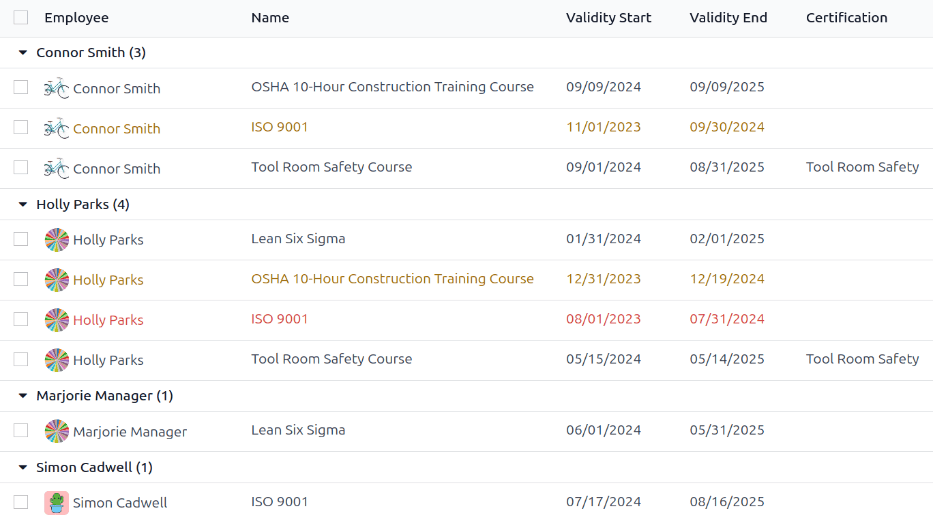
تمام گواهینامهها در نمای لیستی، گروهبندی شده بر اساس کارمند ظاهر میشوند. هر داده گواهینامه موارد زیر را نمایش میدهد:
کارمند: نام کارمند، به همراه تصویر پروفایل او.
نام: عنوان گواهینامه.
شروع اعتبار: زمانی که کارمند گواهینامه را دریافت کرده است.
پایان اعتبار: زمانی که گواهینامه منقضی میشود.
گواهینامه: دوره مربوطه در برنامه نظرسنجیها که توسط کارمند تکمیل شده است (در صورت وجود).
دادهها همچنین با رنگ کدگذاری شدهاند. گواهینامههای فعلی که هنوز معتبر هستند به رنگ سیاه، گواهینامههای منقضی شده به رنگ قرمز و گواهینامههایی که در ۹۰ روز آینده منقضی میشوند به رنگ نارنجی ظاهر میشوند.
مهم
Only certification records with the Display Type set to Certification on their certification form appear on the Employee Certifications report. All other certifications appear in the resume section of the employee form.
مشاهده گواهینامهها بر اساس وضعیت انقضا
هنگام مدیریت تعداد زیادی از کارمندان با گواهینامههای مختلف، تعیین اینکه کدام کارمندان باید گواهینامههای لازم را در نمای لیست پیشفرض بهروز نگه دارند، دشوار است. در این سناریو، مشاهده گواهینامهها بر اساس وضعیت انقضا مفید است.
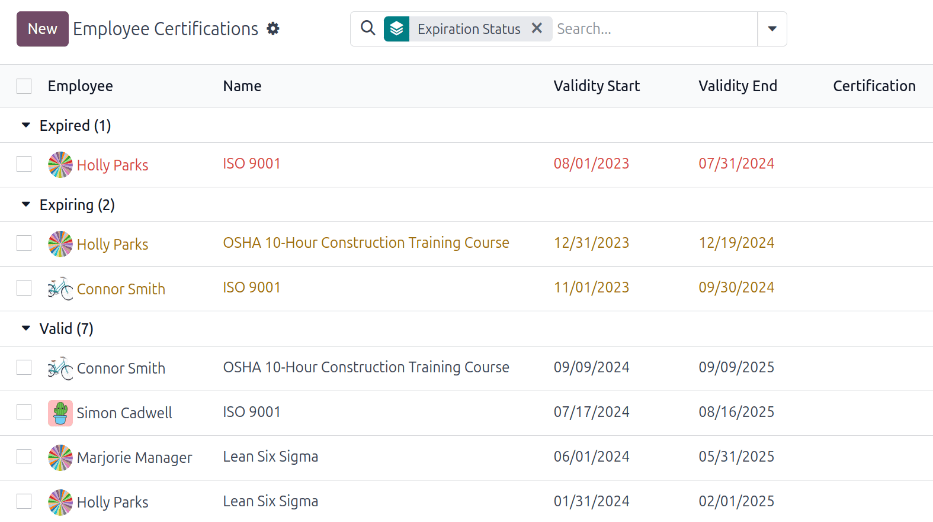
To do so, navigate to . Next, click the :icon:`fa-caret-down` (down arrow) in the search bar, then click Add Custom Group, revealing a drop-down menu. Click Expiration Status, then click away from the drop-down menu to close it.
پس از انجام این کار، تمام گواهینامهها بر اساس وضعیت سازماندهی میشوند، ابتدا گواهینامههای منقضی شده، سپس گواهینامههایی که به زودی منقضی میشوند (در ۹۰ روز آینده) و در آخر، گواهینامههایی که هنوز معتبر هستند.
This view provides an easy way to see which employees have certifications that are going to expire soon, to determine which employees need to take action to keep their certifications current.
ثبت گواهینامه
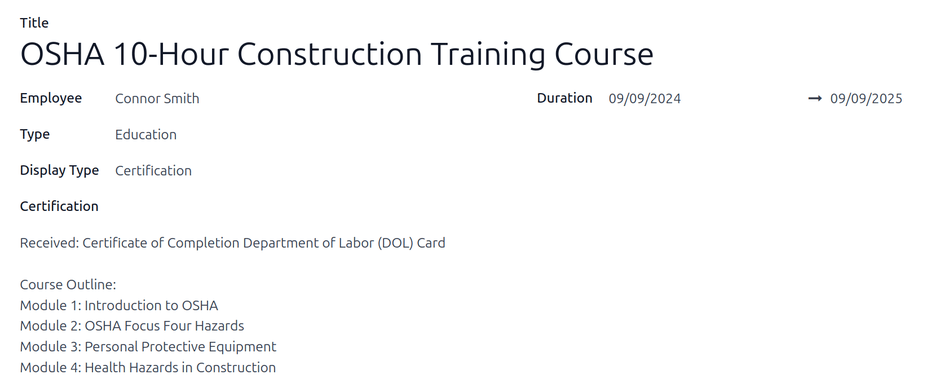
برای ثبت یک گواهینامه برای یک کارمند، وارد مسیر شوید. روی جدید کلیک کنید تا یک فرم گواهینامه خالی بارگیری شود. اطلاعات زیر را در فرم وارد کنید:
عنوان: توضیحات مختصری برای گواهینامه در این فیلد وارد کنید.
کارمند: با استفاده از منوی کشویی، کارمندی را که گواهینامه را دریافت کرده است، انتخاب کنید.
Type: Using the drop-down menu, select the type of certification received. This field determines where on the employee's resume the certification appears. To create a new Type, enter the type in the field, then click Create "type".
گزینههای پیشفرض عبارتند از:
Experience: Select this option to have the certification appear in the Experience section of the Resume tab on the employee form.
تحصیلات: این گزینه را انتخاب کنید تا گواهینامه در بخش تحصیلات تب رزومه در فرم کارمند ظاهر شود.
Internal Certification: Select this option to have the certification appear in the Internal Certification section of the Resume tab on the employee form.
Completed Internal Training: Select this option to have the certification appear in Completed Internal Training section of the Resume tab on the employee form.
نوع نمایش: قابلیت مشاهده گواهینامه را در این فیلد انتخاب کنید. گزینههای پیشفرض عبارتند از:
کلاسیک: این گزینه را انتخاب کنید تا گواهینامه در بخش رزومه فرم کارمند ظاهر شود و در گزارش گواهینامههای کارمند ظاهر نشود.
Course: Select this option to have the certification appear in the Resume section of the employee form, and not appear on the Employee Certifications report. Once this option is selected, a Course field appears beneath the Display Type field. Using the drop-down menu, select the course the employee took. The course is created in the Surveys app.
Certification: Select this option to have the certification appear in the Resume section of the employee form, and appear on the Employee Certifications report. Once this is selected, a Certification field appears beneath the Display Type field. Using the drop-down menu, select the certification the employee took.
توضیحات: توضیحی برای گواهینامه در این فیلد وارد کنید.
مدت زمان: روی فیلد اول کلیک کنید تا پنجره تقویم ظاهر شود. روی تاریخهای شروع و پایان دوره اعتبار گواهینامه کلیک کنید. پس از انتخاب تاریخهای صحیح، روی :icon:`fa-check` اعمال کلیک کنید تا هر دو فیلد پر شوند.