
Employee departures
When an employee leaves, the working relationship between the employee and the company must end. In Odoo, this is referred to as the end of collaboration. First, open the Employees app, locate the employee leaving the company, and click on their employee card.
مهم
This should be done after the employee has been fully offboarded.
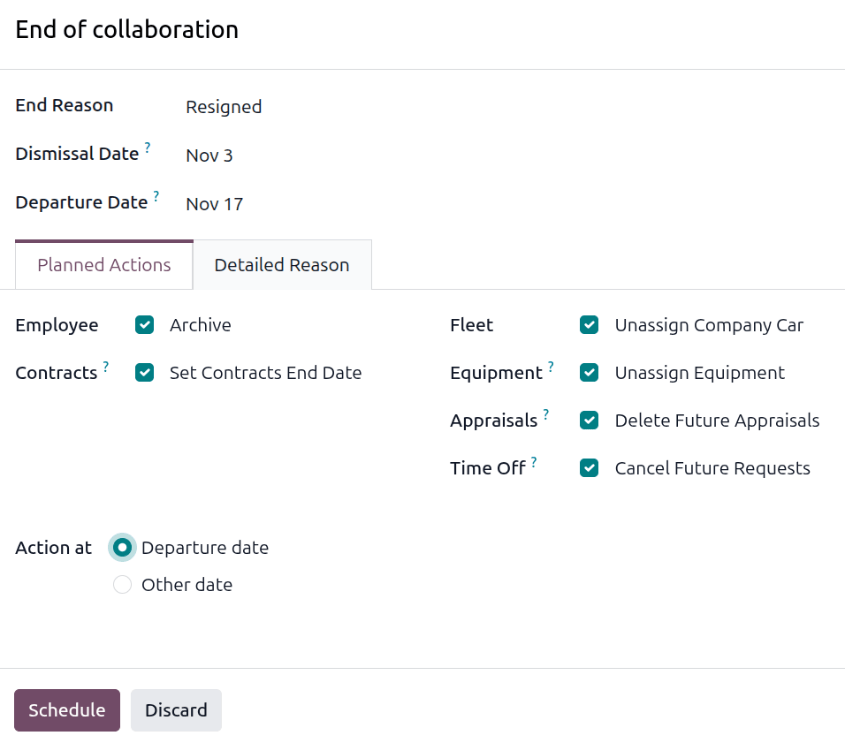
End of collaboration pop-up
Click the (Actions) icon in the corner, and a drop-down menu appears. Click End of Collaboration, and an End of collaboration pop-up window appears.
فیلدهای زیر را در فرم تکمیل کنید:
End Reason: Select the reason the employee is leaving the company, using the drop-down menu. Three default options are available:
اخراج شده: زمانی که یک کارمند اخراج میشود و شرکت اطلاعرسانی کرده است، این گزینه را انتخاب کنید.
استعفا داده: زمانی که کارمند دیگر تمایلی به استخدام ندارد و کارمند اطلاعرسانی کرده است این گزینه را انتخاب کنید.
Resigned: Retired: Select this option when the employee is retiring.
نکته
If a new departure reason is needed, a new one can be created. Close the End of collaboration pop-up window, and navigate to . Click the New button, and a blank line appears at the bottom of the list. Enter the new reason, and click Save.
Dismissal Date: Select the date the departure starts using the calendar selector.
Departure Date: Using the calendar selector, enter the actual day the employee leaves the company.
توجه
The Dismissal Date may differ from the Departure Date in cases where the employee must be notified of their termination for a set period of time before their last day of work. In this situation, the Dismissal Date is the date the employee is given notice, and the Departure Date is their last day at work.
Planned actions tab
The Planned Actions tab is where automated actions are set. Check the box in the options below to perform the related actions:
Employee: Check the Archive option to archive the employee.
Contracts: Check the Set Contracts End Date option to end the employee's current contract and delete any future versions.
Fleet: Check the Unassign Company Car option to remove the employee as the driver for their current company car and assign the next driver, if applicable.
Equipment: Check the Unassign Equipment option to unassign the employee from any assigned equipment.
Appraisals: Check the Delete Future Appraisals option to cancel all appraisals scheduled after the contract end date and archive all goals.
Time Off: Check the Cancel Future Requests option to set the running allocation's validity end date and cancel all future time off requests.
Action at: Select when the above actions are done. The options are:
Departure date: Select this option to have all actions done on the configured Departure Date.
Other date: Select this option to have all actions done on a specific day other than the configured Departure Date. When selected, an Apply date field appears. Leave the field blank to have the actions done immediately, or select a date using the calendar selector.
Detailed reason tab
Enter any information regarding the employee's departure in this field.
Process departure
Once the End of collaboration pop-up window is configured, click the Apply button, and the configured actions are scheduled for the dates set on the form.
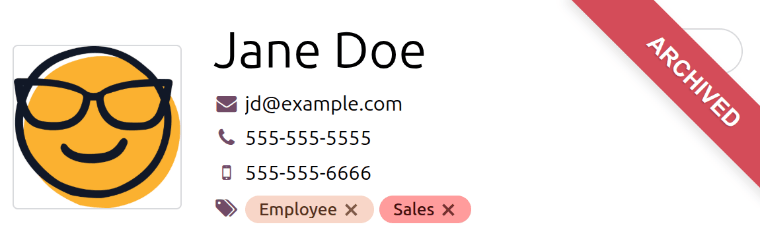
Once the Departure date is reached, the employee record is archived if the Archive option was selected, and a red banner appears on the employee record, stating Archived.
توجه
If any issues exist that prevent Odoo from archiving the employee, the detailed reasons appear in a Validation Error pop-up window. Close the warning pop-up, correct the issues, and click Apply.
نکته
It is possible to archive an employee without using the End of Collaboration option, but it is not recommended as there is less flexibility with related actions.
To archive an employee instead of ending the collaboration, click the (Actions) icon on the employee record, and click Archive.
The employee is archived, their contract end date is set to the current date, and all appraisals, goals, and future time off are canceled. Any vehicles in the Fleet app assigned to the employee remain, as well as any assigned equipment.
For these reasons, it is recommended to use the End of Collaboration method when an employee departs.