
عاملهای هوشمند
An AI agent is a virtual assistant in Odoo that can understand natural-language requests, access information, and perform tasks using the tools available to it. Agents can be configured for specific roles and can be used interactively or as part of automated workflows.
Agents are built from four main components:
Instructions define the agent's purpose, behavior, and responsibilities.
Knowledge provides information the agent can use when completing tasks.
Skills and tools define what the agent can do. Skills provide instructions for specific tasks, while tools allow the agent to perform actions in Odoo.
Triggers determine when the agent is invoked, such as when a user starts a conversation or when an automated or scheduled action calls the agent.
مهم
While many AI features can be used in Odoo without the AI application, creating and customizing agents requires the AI application be installed.
Odoo AI uses In-app purchases (IAP) for AI requests. For more information on using IAP credits, including how to purchase additional credits, visit the Odoo AI IAP.
ساختار عامل
Instructions
Instructions define the agent's overall role, purpose, and behavior.
Each AI agent is assigned a System Prompt that provides its main instructions. It can define the agent's responsibilities, constraints, and how it should respond to requests.
Each Skill also includes its own prompt-like component, called Instructions. Instructions are skill-specific guidelines that refine how the agent behaves in a given context or workflow and how it interacts with the Odoo framework.
دستورالعملها اغلب شامل موارد زیر هستند:
هدف مهارت یا موضوعاتی که مهارت پوشش میدهد.
قوانین یا محدودیتهایی که عامل باید هنگام تخصیص مهارت رعایت کند.
Step-by-step workflows for completing a specific action.
جزئیات فنی لازم برای انجام عملیات.
مهارتها
Skills define specific tasks an agent can perform. Each Skill includes instructions that guide the agent through the task and can have one or more tools assigned to it.
مهم
If an agent is not assigned any Skills, it can only provide information. It cannot complete tasks or make changes to the database.
Multiple Skills can be assigned to the same agent, allowing it to perform different types of tasks.
Agent tools
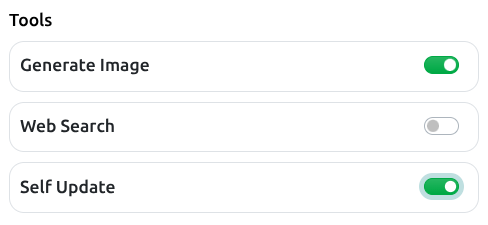
Tools are the functions an agent can perform in Odoo. Each agent has the following tools available:
Generate image: A collection of tools to support image generation. Load this skill when the user asks to generate or enhance an image.
Web Search: Enable the Agent to explore the internet in real time.
Self Update: Allows an agent to identify missing or incomplete instructions and Skills and propose or make changes to its configuration.
To enable a tool on an agent, click the Skills tab, then slide the appropriate toggle to green.
Subagents
An agent can use other AI agents as subagents to handle specialized tasks. When a user submits a request, the main agent can determine whether to delegate part of the task to a subagent based on its purpose and capabilities.
Subagents allow an agent to delegate specific tasks to specialized agents rather than handling every request itself. The main agent can then use the subagent's results as part of its response.
To assign a subagent, click on the Skills tab, scroll to the Subagents section, then click Add. Then, select from the list of existing agents, or click Create New to create a new one.
دانش
منابع دادههایی هستند که عامل میتواند هنگام تولید پاسخ یا تکمیل وظایف به آنها مراجعه کند. منابع ایندکس میشوند تا عامل بتواند هنگام پرسیدن سوال توسط کاربر، اطلاعات مرتبط را بازیابی کند.
Example
عاملی که برای پاسخگویی به سوالات پشتیبانی مشتری طراحی شده است، مقالات دانش را به عنوان منابع شامل میشود که شامل سوالات متداول هستند.
منابع میتوانند در فرمتهای زیر باشند:
مهم
If the Restrict answers to Sources option is enabled on an agent, the agent can only utilize information from the uploaded and active sources.
Reprocessing sources
اگر محتوای منبعی پس از نمایهسازی تغییر کند، ممکن است برای استفاده عاملها از تازهترین اطلاعات لازم باشد منبع دوباره پردازش شود. این بازپردازش را میتوان بهصورت دستی اجرا کرد تا اسناد، پیوندها و مقالههای دانشی بهروزشده در پاسخهای بعدی عاملها لحاظ شوند.
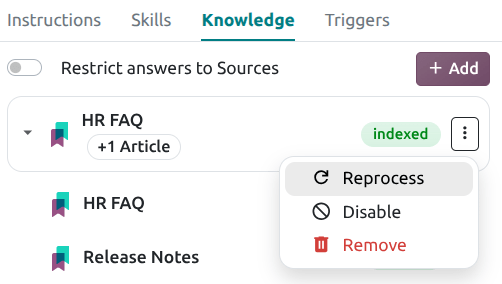
To reprocess a source:
Navigate to the app and select an AI agent.
Click the Knowledge tab, and select a source.
Click the (vertical ellipsis) icon for the source.
On the menu, click Reprocess.
Triggers
An agent can be triggered in different ways depending on how it is used.
Agents can be launched interactively by users through an AI chat. They can also be triggered automatically by automated actions and scheduled actions, allowing agents to participate in automated workflows.
To add a trigger to an agent, navigate to the Trigger tab and click Add. On the When should your agent be triggered? popup, choose from one of the following options:
On a schedule: Runs automatically according to a set frequency.
Based on a Date Field: Runs once per record, as soon as a specific date is reached.
After creation: Runs whenever a new record is added.
After update: Runs whenever a specific field is updated.
نکته
If unsure which option is best for a particular use case, click the I need help to choose option at the bottom of the popup. This opens a conversation with the Odoo AI agent. The agent then walks through the specifics of the use case to help select the best option.
همچنین ملاحظه نمائید
See AI server actions for more information.
ایجاد عامل جدید
To create a new AI agent, navigate to the app and click New. Enter an agent name, then add a short description, if desired.
نکته
Before creating a new agent, it is recommended to have a clear use case in mind. This helps when writing out the Instructions and assigning the Skills.
On the Instructions tab, enter a system prompt with detailed instructions for the agent as to their role and responsibilities.
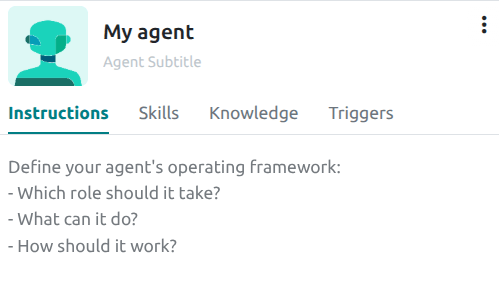
On the Skills tab, select one or more Skills for the agent. As explained above, Skills include both instructions and tools that guide the agent in helping users complete a task.
Slide the Restrict answers to Sources toggle to active to limit the agent to only respond based on the provided resources.