
Uzbekistan
The Uzbekistan payroll localization covers salary computations for employees, including compliance with the Labor Code of Uzbekistan.
Before configuring the Uzbekistan localization, refer to the general payroll documentation, which includes the basic information for all localizations, as well as all universal settings and fields.
Apps & modules
Install the following modules to get all the features of the Uzbekistan payroll localization:
نام |
Technical name |
Dependencies |
Description |
|---|---|---|---|
Uzbekistan - Payroll |
|
|
Includes the Uzbekistan salary structure and rules, work entry (time off) types, departure reasons, severance pay, remaining leave days compensation and annual leave provision, compliant with the Labor Code of Uzbekistan. |
Uzbekistan - Payroll with Accounting |
|
|
Links the Uzbekistan salary rules to the accounts of the Uzbekistan chart of accounts, so validated payslips generate journal entries. |
همچنین ملاحظه نمائید
General configurations
First, the company must be configured. Navigate to . From the list, select the desired company, and configure the following fields:
Company Name: Enter the business name in this field.
Address: Complete the full address, including the City, State, ZIP, and Country.
TIN: Enter the company's TIN.
Currency: By default, UZS is selected. If not, select UZS from the drop-down menu.
Phone: Enter the company phone number.
Email: Enter the email used for general contact information.
کارمندان
Every employee being paid must have their employee profiles configured for the Uzbekistan payroll localization. Additional fields are present after configuring the database for Uzbekistan.
To update an employee form, open the Employees app and click on the desired employee record. On the employee form, configure the required fields in the related tabs.
تب حقوق و دستمزد
بخش نمای کلی قرارداد
This section holds information that drives salary calculations. Ensure the following fields are configured:
Contract: Ensure a running contract exists for the employee.
Wage Type: Select how the employee is paid.
Select Fixed Wage for salaried employees who receive the same amount each pay period.
Select Hourly Wage for employees paid based on hours worked.
Pay Category: Ensure Uzbekistan: Employee is selected for this field. This defines when the employee is paid, their default working schedule, and the work entry type it applies to.
Uzbekistan payroll section
Eligible Leaves: Enter the number of days of annual leave the employee is entitled to, for one year of service. The default value is
21.00days (annual basic minimum leave). This is used to compute the Remaining Leave Days Compensation and the Annual Leave Provision.نکته
Employees entitled to an extended annual leave (27 or 30 calendar days, depending on the extended leave category) are not handled automatically. After the allocation is provided to the employee, the Eligible Leaves value must be changed manually on the employee record.
Initial Average Monthly Wage: Enter the average monthly wage carried over from before the employee's first payslip in Odoo, so that historical payroll data does not need to be re-entered. This is used for the average wage computation of the first payslips. Click Edit to modify this field.
مهم
If validated payslips for the employee exist from the last 12 months, this field is unable to be modified, and an Invalid Operation pop-up window appears.
بخش برنامه زمانی
Working Hours: Using the drop-down menu, select the default work schedule. This is particularly important for employees available to receive overtime pay (typically hourly employees, not salaried). The default is Uzbekistan Working Schedule 40h/Week, which is 8 hours per day, from Monday to Friday, with Saturdays and Sundays being non-working days.
Inputs section
Seniority Supplement: Enter the percentage added to the basic wage, if applicable. This depends on the employee's seniority and has nothing to do with performance.
Other Allowance: Enter the fixed monthly amount paid on top of the basic wage, if applicable.
زبانه اطلاعات شخصی
Ensure the employee has a minimum of one trusted bank account listed in the Bank Accounts field in the Private Contact section.
Payroll cannot be processed for employees without a trusted bank account. If no trusted bank account is set, a warning appears on the Payroll dashboard and an error occurs when attempting to run payroll.
Payroll configuration
Several sections within the Payroll app install a salary structure, structure type, and rules that are specific to Uzbekistan.
Payroll settings
A couple fields in the Payroll app settings must be configred for the Uzbekistan localization. Navigate to and scroll to the Uzbekistan Payroll section.
مهم
The Uzbekistan Payroll section only appears if the company's country is set to Uzbekistan.
Configure the following fields:
Social Tax Category: Using the drop-down menu, set the rate of the employer social tax contribution computed on every payslip. The default value is Taxpayers. The options are:
Social Tax Category
Employer social tax rate
Taxpayers
12%
Budgetary organizations
25%
Association “SOS - Children's Villages of Uzbekistan”
7%
Taxpayers using the labor of persons with disabilities
4.7%
Annual Leave Type: Using the drop-down menu, select which time type is used for annual leave. The allocations of this type tells Odoo how many leave days are allocated and still valid but not yet used. At the employee's departure, the remaining days are paid back through the Remaining Leave Days Compensation rule. The default is Annual Labor Leave.
Pay structures & structure types
When the l10n_uz_hr_payroll module is installed, a new Pay Structure gets installed, Uzbekistan: Employee. This pay structure includes one Structure Type, Uzbekistan: Monthly Pay.
Pay Structure |
Wage type |
Scheduled pay |
Default working schedule |
Default work entry type |
Journal |
|---|---|---|---|---|---|
Uzbekistan: Employee |
Monthly |
Monthly |
Uzbekistan Working Schedule 40h/Week |
کار |
حقوقها |
The Pay Structure contains all the individual salary rules that informs the Payroll app how to calculate employee payslips.
Salary rules
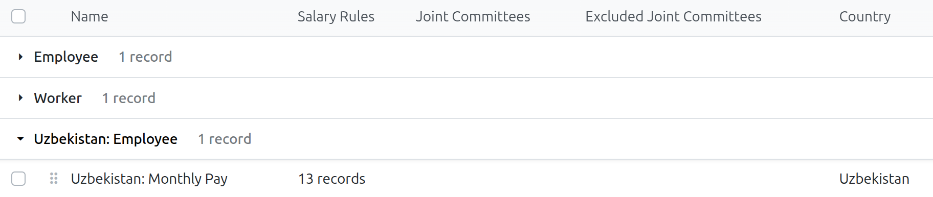
To view the salary rules that inform the salary structure what to do, navigate to and expand the Uzbekistan: Employee group to reveal the Uzbekistan: Monthly Pay structure type. Click Uzbekistan: Monthly Pay to view the detailed salary rules.
Each rule defines how pay is calculated, taking into account factors such as allowances, deductions, and taxes. The Basic and Allowance categories are both children of the Total Wage category, which is the base of the social tax, the pension fund, and the personal income tax.
Rule |
Code |
Category |
روش محاسبه |
|---|---|---|---|
Social Tax - Employer Contribution |
SOCIAL_TAX_EMPLOYER |
Company Contribution |
Social tax rate of the company category x Total Wage. Not displayed on the payslip. |
Pension Fund |
PENSION_FUND |
0.1% x Total Wage. |
|
Seniority Supplement |
SENIORITY_SUPPLEMENT |
Allowance |
Basic salary x Seniority supplement rate. |
Severance Payment |
SEVERANCE |
Allowance (Total Wage) and Tax Base |
Only on the departure payslip, if the departure reason is flagged as Severance Paid: average monthly wage x severance rate. |
Personal Income Tax |
INCOME_TAX |
Deduction |
-12% x Total Wage. |
Expense Reimbursement |
EXPENSE_REIMBURSEMENT |
Amount entered in the Salary Inputs tab of the payslip. It is added to the net wage and is not taxed. |
|
Net Salary |
NET |
Net |
Total Wage + Deductions + Expense Reimbursement. |
حسابداری
When the l10n_uz_hr_payroll_account module is installed, the salary rules are linked to the accounts of the Uzbekistan chart of accounts, and the payslips are posted in the Salaries journal:
Rule |
Debit account |
Credit account |
|---|---|---|
Basic Salary, Seniority Supplement, Bonus, Other Allowance |
9421 Salaries, Allowances & Bonus |
None |
Remaining Leave Days Compensation |
9422 Unused Leave Days Compensation Expense |
None |
Social Tax - Employer Contribution |
9423 Employer Social Tax Expense |
6520 State Fund Contributions Payable |
Severance Payment |
9424 Severance Pay Expense |
None |
Pension Fund |
6410 Taxes & Duties Payable — By Tax Type |
6530 Individual Pension Fund Contributions Payable |
Personal Income Tax |
6410 Taxes & Duties Payable — By Tax Type |
None |
Expense Reimbursement |
6970 Employee Expense Claims Payable |
None |
Net Salary |
None |
6710 Wages & Salaries Payable |
Rule parameters
Some calculations require specific rates associated with them, or wage caps. Rules Parameters are capable of listing a value, either a percentage or a fixed amount, to reference in the salary rules.
Most rules pull information stored in the parameters module to get the rate of the rule (a percentage) and the cap (a dollar amount).
To view rule parameters, navigate to . Here, all rule parameters are displayed with their linked Salary Rules, which can be accessed. Review the parameters associated with a rule by looking for the Name of the rule, and make any edits as needed.
مهم
Odoo adds updated rule parameters for the current calendar year. It is not recommended to edit rule parameters unless a parameter has changed, and is different from the rule parameters created by Odoo. Check with all local and national regulations before making any changes to rule parameters.
The rates are not hard-coded in the salary rules. They are stored as rule parameters that are valid from a given date, so they can be updated without modifying the rules.
Rule parameter |
Technical name |
Value |
Valid from |
|---|---|---|---|
Personal Income Tax Rate |
l10n_uz_income_tax_rate |
12% |
1 Jan 2019 |
Pension Fund Contribution |
l10n_uz_pension_fund_contribution |
0.1% |
1 Jan 2019 |
UZ: Social Tax Rates by Company Category |
l10n_uz_social_tax_rates |
Taxpayers 12%, Budgetary 25%, SOS 7%, Disability 4.7% |
30 Apr 2023 |
Severance Rates by Years of Service |
l10n_uz_severance_rates |
See the End of service section |
30 Apr 2023 |
Monthly Minimum Wage |
l10n_uz_monthly_minimum_wage |
1,360,000 UZS |
1 Sep 2026 |
Leaves
The following time off types are available to employees working in Uzbekistan. They are configured as work entry types of the country and are available in the Time Off app.
Annual labor leave: Annual labor leave is requested and counted in calendar days, and requires an allocation. The basic minimum leave is 21 calendar days per year (the default for the Eligible Leaves field).
Sundays are not paid. When an annual leave request includes one or more Sundays, those days are automatically tracked with the Annual Labor Leave (Sunday) time off type, which is unpaid, and only the remaining days are paid. For example, a five day leave that includes one Sunday has four paid days.
The daily value of an annual leave day is always based on 25.3 days per month, regardless of the actual number of working days in the month (see the Annual leave pay section).
Social leave (Labor Code of the Republic of Uzbekistan (Law No. ZRU-798 of 28 October 2022, in force since 30 April 2023), Art. 236-239): Fully paid. It does not require an allocation.
Partially paid leave: Paid at the rate defined on the time off type. The ratio that is paid is set by the rate of the time off type (it is 0% by default; change it on the type or duplicate the type to define another ratio).
Unpaid leave (Leave without pay): Unpaid. It is a duplicate of the partially paid leave with a rate of 0%.
Study leave: Unpaid.
Child support leave: Fully paid.
All the time off types of the Uzbekistan localization are summarized below:
Time off type |
Code |
Paid rate |
Allocation required |
Counted in |
|---|---|---|---|---|
Annual Labor Leave |
016.00 |
100% |
Yes |
Calendar days |
Annual Labor Leave (Sunday) |
016.00SUN |
0% (created automatically) |
No |
Calendar days |
Social Leave |
UZSOCIAL |
100% |
No |
Working days |
Partially Paid Leave |
UZPARTIALLYPAID |
0% by default (configurable) |
No |
Working days |
Leave without pay |
158.00 |
0% (unpaid) |
No |
Working days |
Study Leave |
UZSTUDY |
0% (unpaid) |
No |
Working days |
Child Support Leave |
UZCHILDSUPPORT |
100% |
No |
Working days |
Guaranteed monthly wage illness (sick leave) |
013.00 |
100% |
No |
Working days |
Public Holiday |
006.00 |
100% |
Yes |
Working days |
Generic Time Off |
LEAVE100 |
100% |
Yes |
Working days |
Compensatory Time Off |
LEAVE105 |
100% |
Yes |
Working days |
توجه
Besides the time off types, the localization provides the following work entry types: Work (002.00), Work from home (002.08), Overtime hours non recoverable - 150% (040.00), and Out Of Contract (000.00, unpaid).
Average wage computation
Annual leave pay, severance pay, and the compensation of remaining leave days are not based on the wage of the current month, but on the employee's average wage. The same computation is used everywhere:
Average monthly wage: The Gross of the past 12 months is added up and divided by 12. If the employee has worked for less than 12 months in the company, only the months worked are taken into account, and the total is divided by the number of months worked.
Average daily wage: The average monthly wage is divided by 25.3.
\[\text{Average daily wage} = \frac{\text{Average monthly wage}}{25.3}\]
Two cases are covered when the employee has no payslip history in Odoo:
If the company has just started using Odoo and has its own historical data, the Initial Average Monthly Wage can be entered on the employee profile and is used for the first payslips.
If the employee has no historical data at all (for example, hired and resigned in the same month), the basic wage and the bonuses of the current month are used for the computation.
Annual leave pay
Annual labor leave is paid according to the following steps Labor Code (2023), Art. 216-235, Art. 233 and Art. 257):
Compute the average monthly wage and the average daily wage, as explained in the previous section.
Count the paid days of leave of the month. Sundays that fall during the leave are unpaid and are excluded.
Multiply the average daily wage by the number of paid leave days.
Annual leave is fully paid, so it is not connected to a dedicated salary rule: it is part of the Basic Salary rule and appears in the Worked Days of the payslip and on the PDF printout.
Example
An employee earns a wage of 18,000,000 UZS per month and takes a leave of seven calendar days in October 2027, from Monday to Sunday, so the leave includes one Sunday.
Average daily wage:
\[\frac{18,000,000}{25.3} = 711,462.45 \text{UZS}\]Paid leave days: 7 - 1 Sunday = 6 days (the Sunday is tracked as Annual Labor Leave (Sunday) and paid 0).
Annual leave pay:
\[6 \times 711,462.45 = 4,268,774.70 \text{UZS}\]
End of service
When an employee leaves the company, the payslip generated for the period of the departure automatically includes the two following rules, in addition to the regular rules:
Severance Payment: if the departure reason entitles the employee to it.
Remaining Leave Days Compensation: for the annual leave that the employee has earned but not taken.
Departure reasons
Each departure reason has a Severance Paid checkbox (Labor Code (2023), Art. 168, points 1, 2, 6 and 9) . It decides whether the employee receives severance pay or not. The following departure reasons are available for Uzbekistan:
Departure reason |
Severance Paid |
|---|---|
No-fault business reasons (employer-initiated) |
Yes |
Circumstances beyond either party's control |
Yes |
Employee declines a change the employer initiated |
Yes |
Employee's own fault |
No |
Employer-side incapacity |
No |
Resignation |
No |
Severance Payment
The severance pay is an allowance (categories Allowance and Tax Base) equal to a percentage of the employee's average monthly wage, computed as for the labor leaves. The percentage depends on the employee's length of service on the departure date:
Length of service (X) |
Severance pay |
|---|---|
X < 3 years |
50% of the average monthly wage |
3 years ≤ X < 5 years |
75% of the average monthly wage |
5 years ≤ X < 10 years |
100% of the average monthly wage |
10 years ≤ X < 15 years |
150% of the average monthly wage |
15 years ≤ X |
200% of the average monthly wage |
The rates are stored in the Severance Rates by Years of Service rule parameter. If the departure reason is not flagged as Severance Paid, the rule is not applied and the employee receives no severance pay.
Remaining Leave Days Compensation
The compensation of the leave days that were not taken is computed according to Article 224 of the Labor Code (Labor Code (2023)), by comparing the leave days the employee has earned with the leave days the employee has taken since the last anniversary of the joining date:
Earned days = Eligible Leaves / 12 x number of months since the anniversary of the employee's joining date.
Taken days = Number of annual leave days taken since the most recent anniversary of the employee's joining date, that is, since the start of the current work year. The days are identified with the time off type selected in the Annual Leave Type setting.
\[\text{Remaining Leave Days Compensation} = \text{Average daily wage} \times \max(0, \text{Earned days} - \text{Taken days})\]
Only the positive difference is paid. If the employee has taken more leave than earned, no compensation is paid and nothing is deducted from the final payslip. Any amount the employee owes for leave taken in advance has to be recovered outside the payroll computation. The average daily wage is the one used for the labor leaves (see the Average wage computation section).
Example
An employee with 21 eligible leave days, whose joining anniversary was 6 months before their departure, has earned 21 / 12 x 6 = 10.5 days. If the employee has taken 4 days since the anniversary, 6.5 days are compensated. With an average daily wage of 711,462.45 UZS, the compensation is 6.5 x 711,462.45 = 4,624,505.93 UZS.
Provisions
Provisions are the amounts computed by the employer to account for the payments that will be made to the employee for the remaining annual leave days. They are computed on every payslip under the Company Contribution category, do not appear on the payslip, and do not affect the employee's net wage.
Annual leave provision: This is computed by dividing the eligible leave days by 12, and multiplying the result by the average daily wage of the employee (the average monthly wage divided by 25.3).
\[\mathbf{Annual\ Leave\ Provision} = \frac{\text{Eligible Leaves}}{12} \times \frac{\text{Average monthly wage}}{25.3}\]
Example
With 21 eligible leave days and an average monthly wage of 18,000,000 UZS: 21 / 12 x (18,000,000 / 25.3) = 1.75 x 711,462.45 = 1,245,059.29 UZS per month.
توجه
It is not enabled and does not have any account linked.
Run Uzbekistan payroll
Before running paypoll, the payroll officer must validate employee's time offs and attendances, to confirm pay accuracy and catch errors. Once everything is correct, draft payslips can be created individually or in groups, referred to in the Payroll app as Pay Runs.
توجه
To cut down on the payroll officer's time, it is typical to process pay runs instead of one payslip at a time.
When running a pay run, check that the period, company and employees included are correct before starting to analyze or validate the data. Once the payslips are drafted, review them for accuracy:
In the Worked Days tab, ensure that the listed worked time and time off are correct. Annual labor leave Sundays are listed on a separate line with an amount of
0.In the Salary Inputs tab, add any missing inputs: Bonus and Expense Reimbursement.
Check the various totals: Gross (Total Wage), personal income tax, pension fund, employer social tax, severance pay and remaining leave days compensation on departure payslips, and the net salary.
Click Compute to update the salary calculations if there were edits. If everything is correct, click Validate.
Example
The October 2026 payslip of an employee with a wage of 18,000,000 UZS (22 working days), who worked 17 days and took the 7-day annual leave of the previous example, is computed as follows:
Line |
روش محاسبه |
Amount (UZS) |
|---|---|---|
Basic Salary |
18,000,000 x 17 / 22 (worked days) + 4,268,774.70 (6 paid leave days) |
18,177,865.61 |
Gross |
Total Wage |
18,177,865.61 |
Personal Income Tax |
12% of the Total Wage |
-2,181,343.87 |
Net Salary |
Total Wage + Deductions |
15,996,521.74 |
Pension Fund |
0.1% of the Total Wage (does not reduce the net) |
18,177.87 |
Social Tax - Employer Contribution |
12% of the Total Wage (company cost) |
2,181,343.87 |
Annual Leave Provision |
21 / 12 x (18,000,000 / 25.3) (company cost) |
1,245,059.29 |
Close Payroll
If there are no errors, payroll is completed for the pay period.
Social tax and other contributions
The following contributions and taxes are computed on every payslip. All of them are calculated on the Total Wage, which is the sum of the Basic and Allowance categories (basic wage, seniority supplement, bonus, other allowance, severance pay and remaining leave days compensation).
Rule
Rate
Effect on the payslip
Social Tax - Employer Contribution
12% by default (4.7% to 25% depending on the Social Tax Category)
Company contribution paid by the employer. It does not affect the employee's net wage and is not displayed on the payslip.
Pension Fund
0.1%
Contribution to the individual pension fund (INPS). The rule does not belong to the deduction category, so it does not reduce the net wage.
Personal Income Tax
12%
Deducted from the employee's wage. Its base is the Total Wage (Basic + Allowances).